# Aurora Store
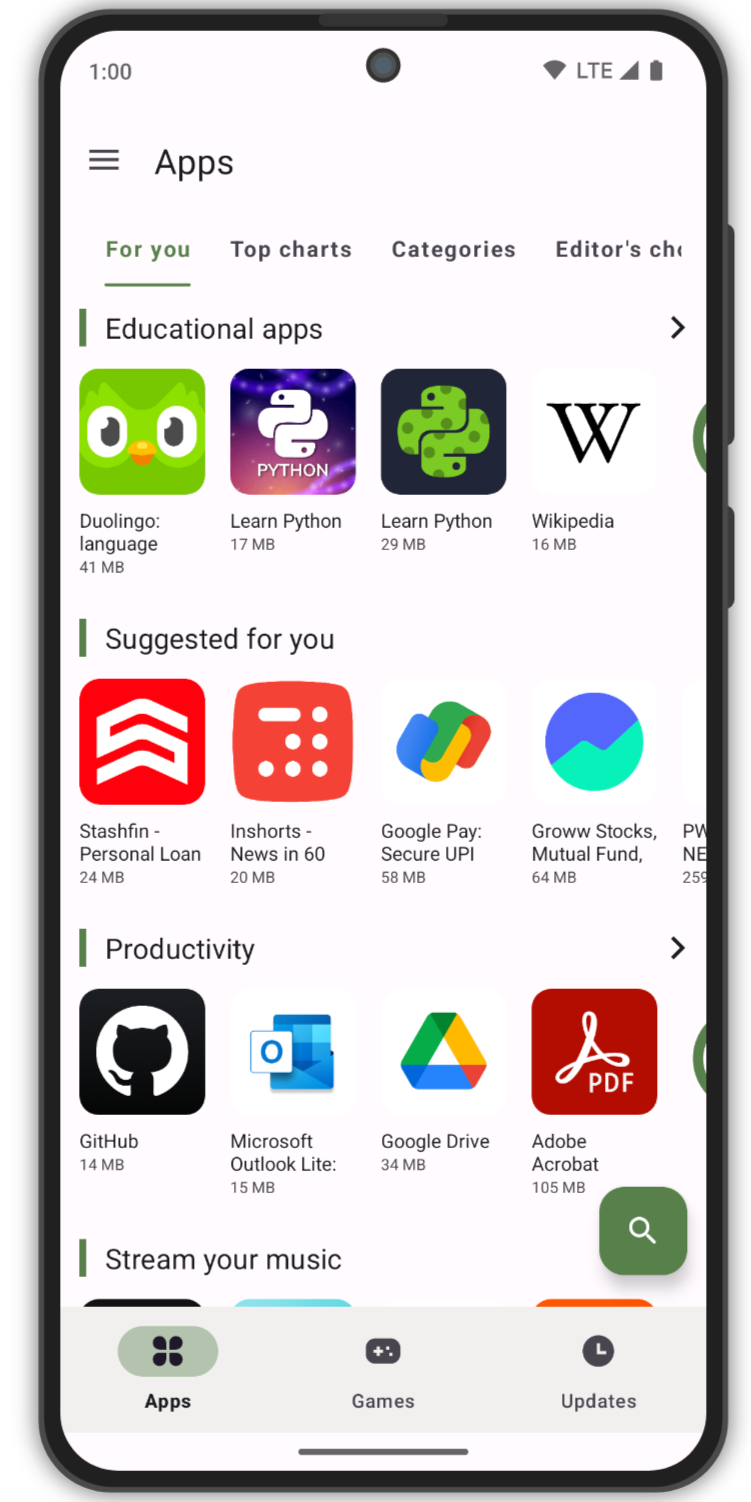
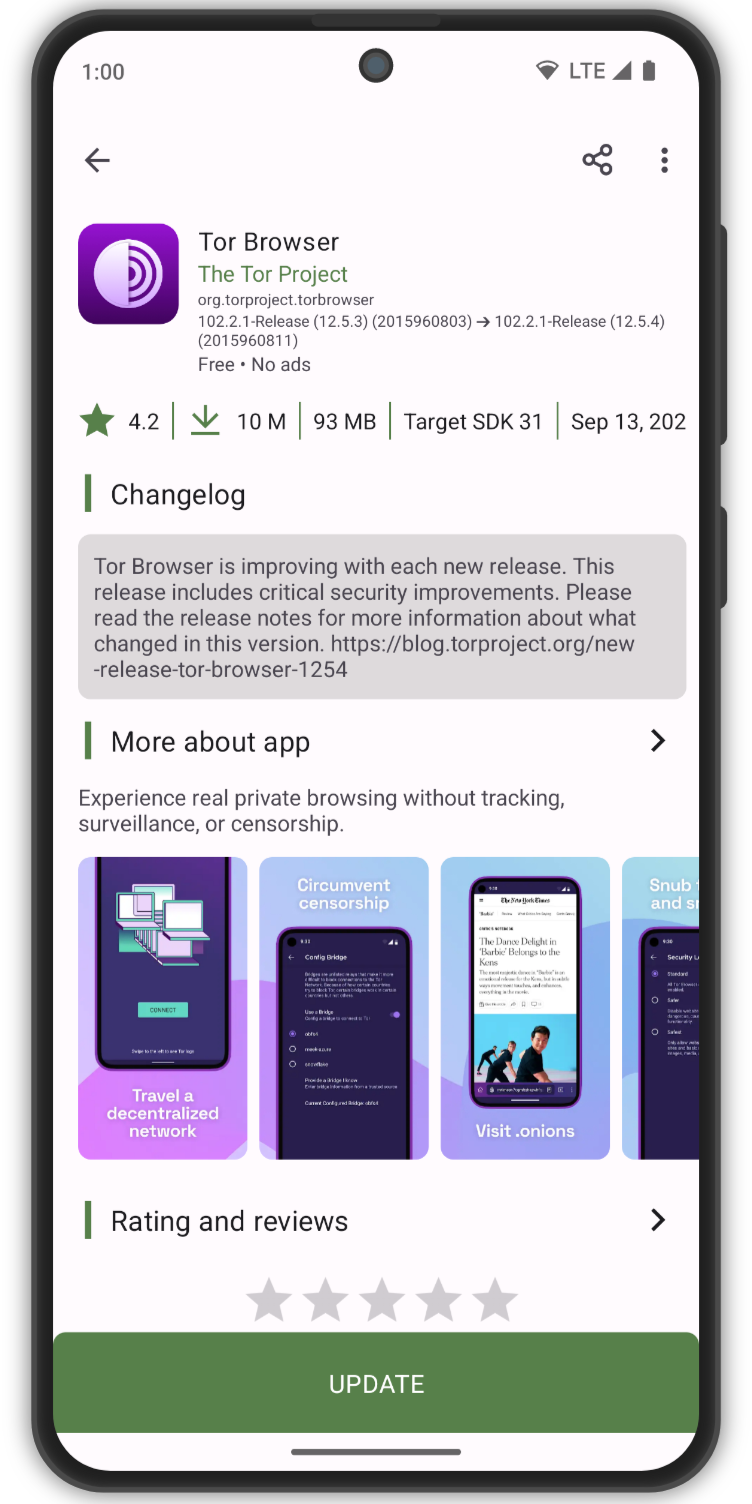
Aurora Store enables you to search and download apps from the official Google Play store. You can check app descriptions, screenshots, updates, reviews, and download the APK directly from Google Play to your device.
To use Aurora Store, log in using Google Play account, when you first open and configure Aurora Store.
Unlike a traditional app store, Aurora Store does not own, license or distribute any apps. All apps, app descriptions, screenshots and other content in Aurora Store are directly accessed, downloaded and/or displayed from Google Play.
Aurora Store works exactly like a door or a browser, allowing you to log in to your Google Play account and find the apps from Google Play.
*_Please note that Aurora Store does not have any approval, sponsorship or authorization from Google, Google Play, any apps downloaded through Aurora Store or any app developers; neither does Aurora Store have any affiliation, cooperation or connection with them._*
[ ](https://f-droid.org/packages/com.aurora.store/)
[
](https://f-droid.org/packages/com.aurora.store/)
[ ](https://apt.izzysoft.de/fdroid/index/apk/com.aurora.store)
## Features
- FOSS: Has GPLv3 licence
- Beautiful design: Built upon latest Material 3 guidelines
- Account login: You can login with either personal or an anonymous account
- Device & Locale spoofing: Change your device and/or locale to access geo locked apps
- [Exodus Privacy](https://exodus-privacy.eu.org/) integration: Instantly see trackers in app
- [Plexus](https://plexus.techlore.tech/) integration: Instantly see app compatibility without Google Play Services or with microG
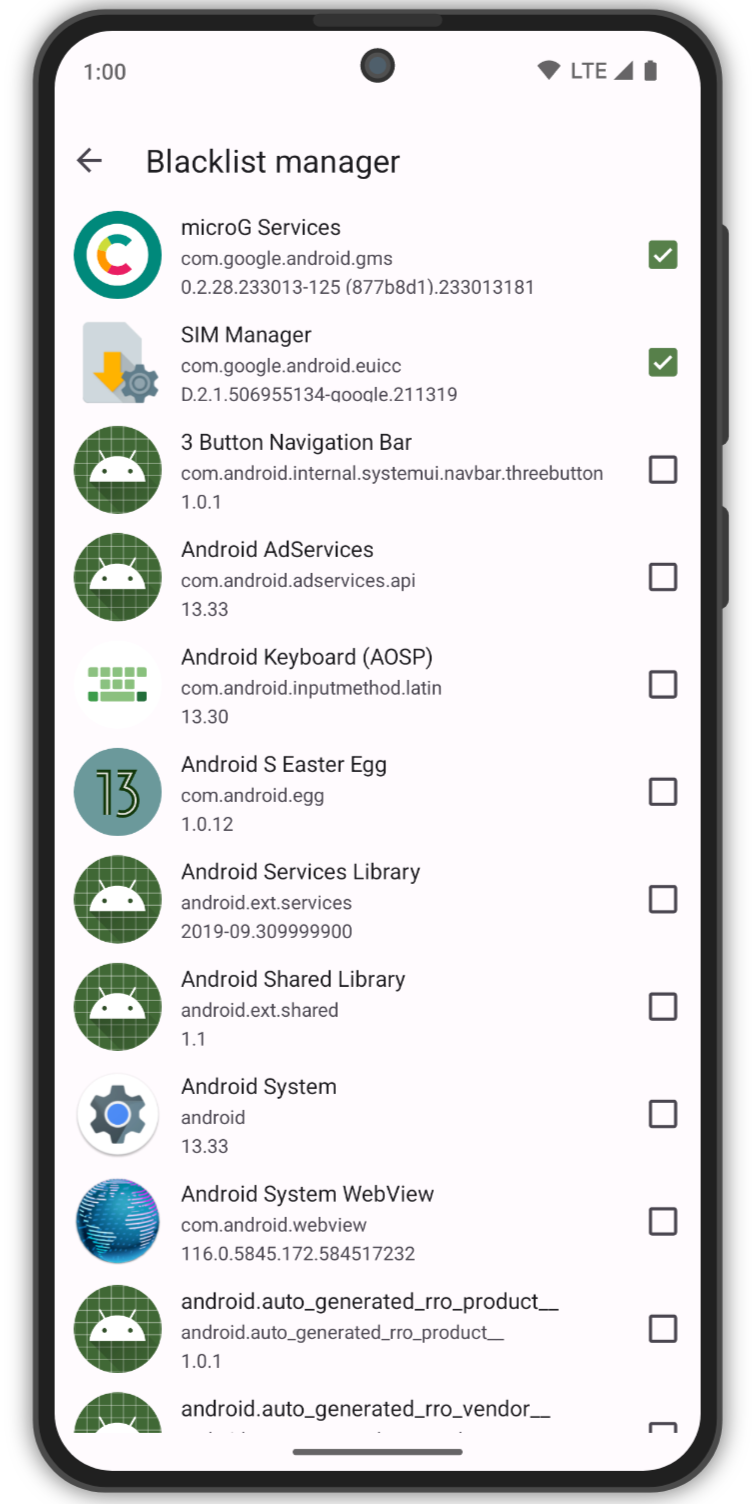
- Updates blacklisting: Ignore updates for specific apps
- Download manager
- Manual downloads: allows you to download older version of apps, provided
- The APKs are available with Google
- You know the version codes for older versions
## Limitations
- The underlying API used is reversed engineered from the Google Play Store, changes on side may break it.
- Provides only base minimum features
- Can not download or update paid apps.
- Can not update apps/games with [Play Asset Delivery](https://developer.android.com/guide/playcore/asset-delivery)
- Multiple in-app features are not available if logged in as Anonymous.
- Library
- Purchase History
- Editor's choice
- Beta Programs
- Review Add/Update
- Token dispenser server is not super reliable, downtimes are expected.
## Downloads
Please only download the latest stable releases from one of these sources:
- [Official website](https://auroraoss.com/)
- [GitLab Releases](https://gitlab.com/AuroraOSS/AuroraStore/-/releases)
- [IzzyOnDroid](https://apt.izzysoft.de/fdroid/index/apk/com.aurora.store) (reproducible)
- [F-Droid](https://f-droid.org/packages/com.aurora.store/) (signed by F-Droid, [more details](https://f-droid.org/docs/Signing_Process/))
- [App Gallery](https://appgallery.huawei.com/app/C110907863) (limited to certain countries)
You can also get latest debug builds signed with AOSP test keys for testing latest changes from our [GitLab Package Registry](https://gitlab.com/AuroraOSS/AuroraStore/-/packages/24103616).
## Headless APK Downloader
This repository includes a JVM CLI module for downloading the latest available APK files for a Google Play package name. Build the compiled distribution once:
```bash
./gradlew :apk-downloader:installDist
```
Then run the generated launcher directly, without Gradle:
```bash
./apk-downloader/build/install/apk-downloader/bin/apk-downloader org.mozilla.firefox
```
By default, files are saved under `./downloads///`. To choose a different output directory:
```bash
./apk-downloader/build/install/apk-downloader/bin/apk-downloader org.mozilla.firefox --out ./downloads
```
When Google Play returns multiple APK files, the downloader keeps the verified raw files and also writes a split APK archive next to them:
```text
downloads///
base.apk
config_*.apk
_.apks
```
This `.apks` file is a zip archive of the downloaded base/split APKs for split-aware installers. It is not a true universal APK. Bundletool can create a universal APK from an Android App Bundle (`.aab`) with `build-apks --mode=universal`, but Google Play download delivery provides APK files here, not the original `.aab`, so bundletool cannot merge these split APKs back into one universal APK.
To create a portable archive:
```bash
./gradlew :apk-downloader:distZip
```
The archive is written to `apk-downloader/build/distributions/apk-downloader.zip`. Unzip it anywhere with Java 17+ installed and run `bin/apk-downloader`.
For development, you can still run through Gradle:
```bash
./gradlew :apk-downloader:run --args="org.mozilla.firefox"
```
You can also build a Docker image for the downloader:
```bash
docker build -f apk-downloader/Dockerfile -t aurora-apk-downloader .
docker run --rm \
-v "$PWD/downloads:/downloads" \
-v "$HOME/.config/aurora-apk-downloader:/root/.config/aurora-apk-downloader" \
aurora-apk-downloader \
com.nestle.tr.nescafe.nescafe3in1loyaltyapp --country TR --out /downloads
```
If your Proton VPN runs in a separate VPN container, run the downloader with that container's network namespace, for example `--network container:`.
The image also includes an exec-friendly wrapper that takes the country first, then the package name. Start a reusable container and run downloads with `docker exec`:
```bash
docker run -d --name aurora-apk-downloader \
-v "$PWD/downloads:/downloads" \
-v "$HOME/.config/aurora-apk-downloader:/root/.config/aurora-apk-downloader" \
--entrypoint sleep \
aurora-apk-downloader infinity
docker exec aurora-apk-downloader \
download-apk TR com.nestle.tr.nescafe.nescafe3in1loyaltyapp
```
To run Proton VPN inside Docker instead of on the host, use the bundled Compose file. Copy the example environment file, fill in your Proton WireGuard values, then start the reusable downloader stack:
```bash
cp apk-downloader/proton.env.example apk-downloader/proton.env
# edit apk-downloader/proton.env
docker compose \
--env-file apk-downloader/proton.env \
-f apk-downloader/docker-compose.proton.yml \
up -d --build
docker compose \
--env-file apk-downloader/proton.env \
-f apk-downloader/docker-compose.proton.yml \
exec downloader download-apk TR com.nestle.tr.nescafe.nescafe3in1loyaltyapp
```
If `APK_COUNTRY` and `APK_PACKAGE` are set in the env file, you can use those defaults instead:
```bash
docker compose \
--env-file apk-downloader/proton.env \
-f apk-downloader/docker-compose.proton.yml \
exec downloader sh -lc 'download-apk "$APK_COUNTRY" "$APK_PACKAGE"'
```
For Proton WireGuard, set `WIREGUARD_PRIVATE_KEY` and `WIREGUARD_ADDRESSES` from a Proton VPN WireGuard config. For OpenVPN, set `VPN_TYPE=openvpn` and use Proton's OpenVPN/IKEv2 username and password in `OPENVPN_USER` and `OPENVPN_PASSWORD`.
## Certificate Fingerprints
- SHA1: 94:42:75:D7:59:8B:C0:3E:48:85:06:06:42:25:A7:19:90:A2:22:02
- SHA256: 4C:62:61:57:AD:02:BD:A3:40:1A:72:63:55:5F:68:A7:96:63:FC:3E:13:A4:D4:36:9A:12:57:09:41:AA:28:0F
## Support
Aurora Store v4 is still in on-going development! Bugs are to be expected! Any bug reports are appreciated.
Please visit [Aurora Wiki](https://gitlab.com/AuroraOSS/AuroraStore/-/wikis/home) for FAQs.
- [Telegram](https://t.me/AuroraSupport)
- [XDA Developers](https://forum.xda-developers.com/t/app-5-0-aurora-store-open-source-google-play-client.3739733/)
## Permissions
- `android.permission.INTERNET` to download and install/update apps from the Google Play servers
- `android.permission.ACCESS_NETWORK_STATE` to check internet availability
- `android.permission.FOREGROUND_SERVICE` to download apps without interruption
- `android.permission.FOREGROUND_SERVICE_DATA_SYNC` to download apps without interruption
- `android.permission.REQUEST_IGNORE_BATTERY_OPTIMIZATIONS` to auto-update apps without interruption (optional)
- `android.permission.MANAGE_EXTERNAL_STORAGE` to access the OBB directory to download APK expansion files for games or large apps
- `android.permission.READ_EXTERNAL_STORAGE` to access the OBB directory to download APK expansion files for games or large apps
- `android.permission.WRITE_EXTERNAL_STORAGE` to access the OBB directory to download APK expansion files for games or large apps
- `android.permission.QUERY_ALL_PACKAGES` to check updates for all installed apps
- `android.permission.REQUEST_INSTALL_PACKAGES` to install and update apps
- `android.permission.REQUEST_DELETE_PACKAGES` to uninstall apps
- `android.permission.ENFORCE_UPDATE_OWNERSHIP` to silently update apps
- `android.permission.UPDATE_PACKAGES_WITHOUT_USER_ACTION` to silently update apps
- `android.permission.POST_NOTIFICATIONS` to notify user about ongoing downloads, available updates, and errors (optional)
- `android.permission.USE_CREDENTIALS` to allow users to sign into their personal Google account via microG
## Screenshots
](https://apt.izzysoft.de/fdroid/index/apk/com.aurora.store)
## Features
- FOSS: Has GPLv3 licence
- Beautiful design: Built upon latest Material 3 guidelines
- Account login: You can login with either personal or an anonymous account
- Device & Locale spoofing: Change your device and/or locale to access geo locked apps
- [Exodus Privacy](https://exodus-privacy.eu.org/) integration: Instantly see trackers in app
- [Plexus](https://plexus.techlore.tech/) integration: Instantly see app compatibility without Google Play Services or with microG
- Updates blacklisting: Ignore updates for specific apps
- Download manager
- Manual downloads: allows you to download older version of apps, provided
- The APKs are available with Google
- You know the version codes for older versions
## Limitations
- The underlying API used is reversed engineered from the Google Play Store, changes on side may break it.
- Provides only base minimum features
- Can not download or update paid apps.
- Can not update apps/games with [Play Asset Delivery](https://developer.android.com/guide/playcore/asset-delivery)
- Multiple in-app features are not available if logged in as Anonymous.
- Library
- Purchase History
- Editor's choice
- Beta Programs
- Review Add/Update
- Token dispenser server is not super reliable, downtimes are expected.
## Downloads
Please only download the latest stable releases from one of these sources:
- [Official website](https://auroraoss.com/)
- [GitLab Releases](https://gitlab.com/AuroraOSS/AuroraStore/-/releases)
- [IzzyOnDroid](https://apt.izzysoft.de/fdroid/index/apk/com.aurora.store) (reproducible)
- [F-Droid](https://f-droid.org/packages/com.aurora.store/) (signed by F-Droid, [more details](https://f-droid.org/docs/Signing_Process/))
- [App Gallery](https://appgallery.huawei.com/app/C110907863) (limited to certain countries)
You can also get latest debug builds signed with AOSP test keys for testing latest changes from our [GitLab Package Registry](https://gitlab.com/AuroraOSS/AuroraStore/-/packages/24103616).
## Headless APK Downloader
This repository includes a JVM CLI module for downloading the latest available APK files for a Google Play package name. Build the compiled distribution once:
```bash
./gradlew :apk-downloader:installDist
```
Then run the generated launcher directly, without Gradle:
```bash
./apk-downloader/build/install/apk-downloader/bin/apk-downloader org.mozilla.firefox
```
By default, files are saved under `./downloads///`. To choose a different output directory:
```bash
./apk-downloader/build/install/apk-downloader/bin/apk-downloader org.mozilla.firefox --out ./downloads
```
When Google Play returns multiple APK files, the downloader keeps the verified raw files and also writes a split APK archive next to them:
```text
downloads///
base.apk
config_*.apk
_.apks
```
This `.apks` file is a zip archive of the downloaded base/split APKs for split-aware installers. It is not a true universal APK. Bundletool can create a universal APK from an Android App Bundle (`.aab`) with `build-apks --mode=universal`, but Google Play download delivery provides APK files here, not the original `.aab`, so bundletool cannot merge these split APKs back into one universal APK.
To create a portable archive:
```bash
./gradlew :apk-downloader:distZip
```
The archive is written to `apk-downloader/build/distributions/apk-downloader.zip`. Unzip it anywhere with Java 17+ installed and run `bin/apk-downloader`.
For development, you can still run through Gradle:
```bash
./gradlew :apk-downloader:run --args="org.mozilla.firefox"
```
You can also build a Docker image for the downloader:
```bash
docker build -f apk-downloader/Dockerfile -t aurora-apk-downloader .
docker run --rm \
-v "$PWD/downloads:/downloads" \
-v "$HOME/.config/aurora-apk-downloader:/root/.config/aurora-apk-downloader" \
aurora-apk-downloader \
com.nestle.tr.nescafe.nescafe3in1loyaltyapp --country TR --out /downloads
```
If your Proton VPN runs in a separate VPN container, run the downloader with that container's network namespace, for example `--network container:`.
The image also includes an exec-friendly wrapper that takes the country first, then the package name. Start a reusable container and run downloads with `docker exec`:
```bash
docker run -d --name aurora-apk-downloader \
-v "$PWD/downloads:/downloads" \
-v "$HOME/.config/aurora-apk-downloader:/root/.config/aurora-apk-downloader" \
--entrypoint sleep \
aurora-apk-downloader infinity
docker exec aurora-apk-downloader \
download-apk TR com.nestle.tr.nescafe.nescafe3in1loyaltyapp
```
To run Proton VPN inside Docker instead of on the host, use the bundled Compose file. Copy the example environment file, fill in your Proton WireGuard values, then start the reusable downloader stack:
```bash
cp apk-downloader/proton.env.example apk-downloader/proton.env
# edit apk-downloader/proton.env
docker compose \
--env-file apk-downloader/proton.env \
-f apk-downloader/docker-compose.proton.yml \
up -d --build
docker compose \
--env-file apk-downloader/proton.env \
-f apk-downloader/docker-compose.proton.yml \
exec downloader download-apk TR com.nestle.tr.nescafe.nescafe3in1loyaltyapp
```
If `APK_COUNTRY` and `APK_PACKAGE` are set in the env file, you can use those defaults instead:
```bash
docker compose \
--env-file apk-downloader/proton.env \
-f apk-downloader/docker-compose.proton.yml \
exec downloader sh -lc 'download-apk "$APK_COUNTRY" "$APK_PACKAGE"'
```
For Proton WireGuard, set `WIREGUARD_PRIVATE_KEY` and `WIREGUARD_ADDRESSES` from a Proton VPN WireGuard config. For OpenVPN, set `VPN_TYPE=openvpn` and use Proton's OpenVPN/IKEv2 username and password in `OPENVPN_USER` and `OPENVPN_PASSWORD`.
## Certificate Fingerprints
- SHA1: 94:42:75:D7:59:8B:C0:3E:48:85:06:06:42:25:A7:19:90:A2:22:02
- SHA256: 4C:62:61:57:AD:02:BD:A3:40:1A:72:63:55:5F:68:A7:96:63:FC:3E:13:A4:D4:36:9A:12:57:09:41:AA:28:0F
## Support
Aurora Store v4 is still in on-going development! Bugs are to be expected! Any bug reports are appreciated.
Please visit [Aurora Wiki](https://gitlab.com/AuroraOSS/AuroraStore/-/wikis/home) for FAQs.
- [Telegram](https://t.me/AuroraSupport)
- [XDA Developers](https://forum.xda-developers.com/t/app-5-0-aurora-store-open-source-google-play-client.3739733/)
## Permissions
- `android.permission.INTERNET` to download and install/update apps from the Google Play servers
- `android.permission.ACCESS_NETWORK_STATE` to check internet availability
- `android.permission.FOREGROUND_SERVICE` to download apps without interruption
- `android.permission.FOREGROUND_SERVICE_DATA_SYNC` to download apps without interruption
- `android.permission.REQUEST_IGNORE_BATTERY_OPTIMIZATIONS` to auto-update apps without interruption (optional)
- `android.permission.MANAGE_EXTERNAL_STORAGE` to access the OBB directory to download APK expansion files for games or large apps
- `android.permission.READ_EXTERNAL_STORAGE` to access the OBB directory to download APK expansion files for games or large apps
- `android.permission.WRITE_EXTERNAL_STORAGE` to access the OBB directory to download APK expansion files for games or large apps
- `android.permission.QUERY_ALL_PACKAGES` to check updates for all installed apps
- `android.permission.REQUEST_INSTALL_PACKAGES` to install and update apps
- `android.permission.REQUEST_DELETE_PACKAGES` to uninstall apps
- `android.permission.ENFORCE_UPDATE_OWNERSHIP` to silently update apps
- `android.permission.UPDATE_PACKAGES_WITHOUT_USER_ACTION` to silently update apps
- `android.permission.POST_NOTIFICATIONS` to notify user about ongoing downloads, available updates, and errors (optional)
- `android.permission.USE_CREDENTIALS` to allow users to sign into their personal Google account via microG
## Screenshots
 ## Translations
Don't see your preferred language? Click on the widget below to help translate Aurora Store!
## Translations
Don't see your preferred language? Click on the widget below to help translate Aurora Store!
 ## Donations
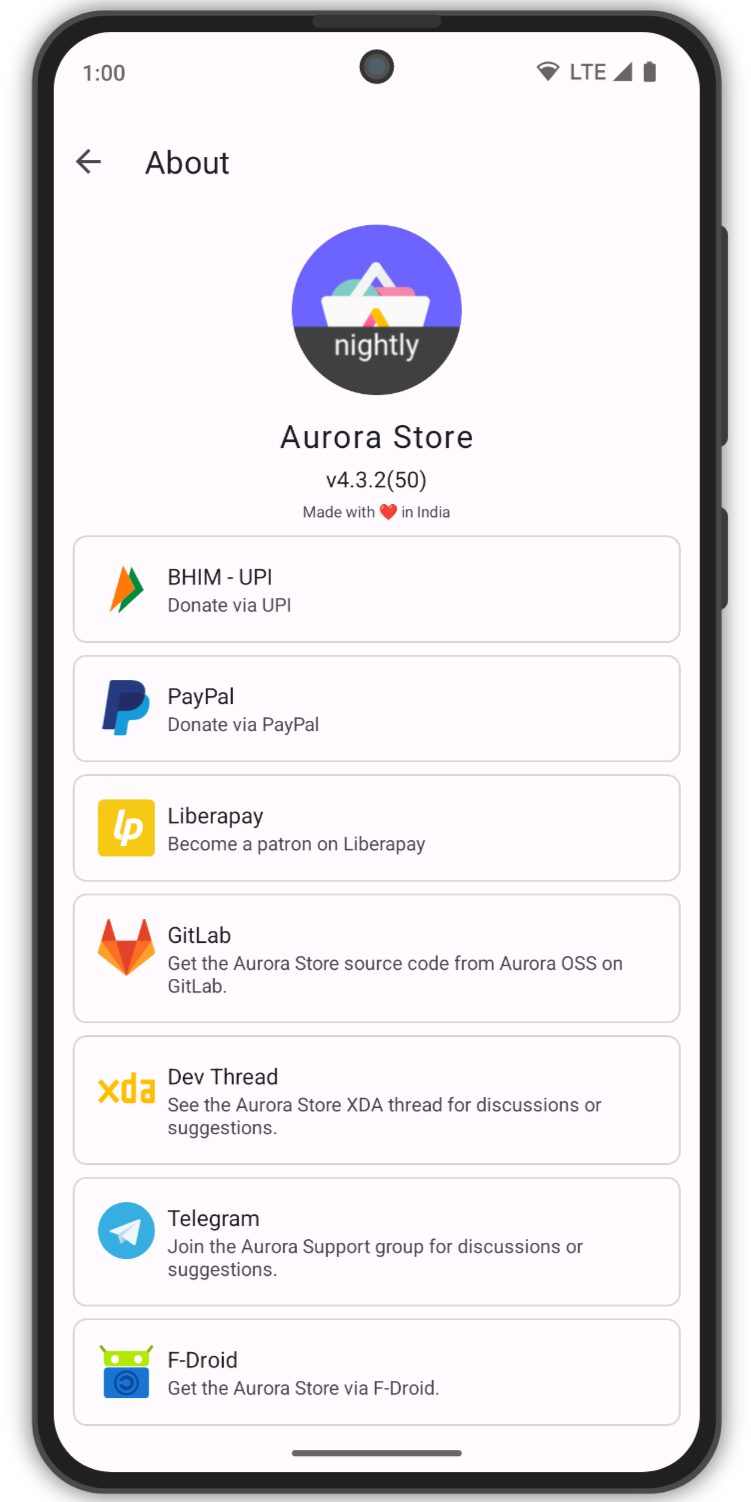
You can support Aurora Store's development financially via options below. For more options, checkout the **About** page within the Aurora Store.
[](https://liberapay.com/whyorean)
## Donations
You can support Aurora Store's development financially via options below. For more options, checkout the **About** page within the Aurora Store.
[](https://liberapay.com/whyorean)
 ## Project references
Aurora Store is based on these projects
- [YalpStore](https://github.com/yeriomin/YalpStore)
- [AppCrawler](https://github.com/Akdeniz/google-play-crawler)
- [Raccoon](https://github.com/onyxbits/raccoon4)
- [SAI](https://github.com/Aefyr/SAI)
## Project references
Aurora Store is based on these projects
- [YalpStore](https://github.com/yeriomin/YalpStore)
- [AppCrawler](https://github.com/Akdeniz/google-play-crawler)
- [Raccoon](https://github.com/onyxbits/raccoon4)
- [SAI](https://github.com/Aefyr/SAI)